Microsoft Signature Teams Rooms vs Standard Microsoft Teams Rooms
While both solutions run Microsoft Teams Rooms software, a Microsoft Signature Teams Room is designed to deliver a more inclusive, immersive, and equitable hybrid meeting experience. It combines Microsoft's recommended room design principles with intelligent AV technologies to ensure in-room and remote participants enjoy the same level of engagement.
| Standard Microsoft Teams Room |
Microsoft Signature Teams Room |
| Provides a reliable Microsoft Teams meeting experience. |
Optimizes hybrid collaboration with Front Row, intelligent cameras, premium audio, and room layouts designed for equal participation. |
| Suitable for general meeting spaces. |
Purpose-built for executive boardrooms, collaboration spaces, and modern hybrid workplaces where meeting equity is a priority. |
Still evaluating collaboration platforms? See how Microsoft Signature Teams Rooms compare with Zoom Rooms and Google Meet Rooms to understand which solution best fits your meeting spaces, collaboration workflows, and enterprise requirements.
Microsoft Teams Rooms vs Zoom Rooms vs Google Meet Rooms
Choosing the right meeting room platform depends on your existing collaboration ecosystem, security requirements, and business workflows. While all three platforms support high-quality video conferencing, Microsoft Teams Rooms are often the preferred choice for organisations already using Microsoft 365, offering seamless integration with Teams, Outlook, OneDrive, SharePoint, and enterprise security features.
| Feature |
Microsoft Teams Rooms |
Zoom Rooms |
Google Meet Rooms |
| Best suited for |
Microsoft 365 environments |
Zoom-first organisations |
Google Workspace users |
| Calendar Integration |
Microsoft Outlook |
Zoom & Exchange |
Google Calendar |
| Enterprise Security |
Advanced Microsoft security & compliance |
Enterprise security features |
Google Workspace security |
| Ideal for |
Hybrid collaboration and enterprise meeting rooms |
Zoom-based collaboration |
Google Workspace collaboration |
Already using Microsoft 365? Microsoft Signature Teams Rooms provide the most integrated and consistent meeting experience by combining intelligent room technology, premium AV solutions, and seamless Microsoft Teams collaboration. For guidance on room sizing, camera placement, audio design, network readiness, and budget planning, read our guide to designing future-ready Microsoft Teams Rooms for Indian boardrooms.
Not sure which collaboration platform is right for your organisation? Compare Microsoft Teams Rooms with our Zoom Rooms solutions and Google Meet Rooms solutions to evaluate features, integrations, and deployment options before choosing the platform that best fits your business.
See how Microsoft Teams Rooms compare with Zoom Rooms and Google Meet Rooms to choose the best platform for your organisation.
If you're planning a new deployment, our guide to designing future-ready Microsoft Teams Rooms for Indian boardrooms explains the key planning, technology, and room design considerations.
Our Signature Features
Microsoft Signature Teams Rooms combine Microsoft's intelligent collaboration platform with enterprise-grade audio-visual technology to create meeting spaces that are inclusive, intuitive, and easy to manage. These features work together to improve meeting quality, reduce manual intervention, and provide a consistent experience for both in-room and remote participants.
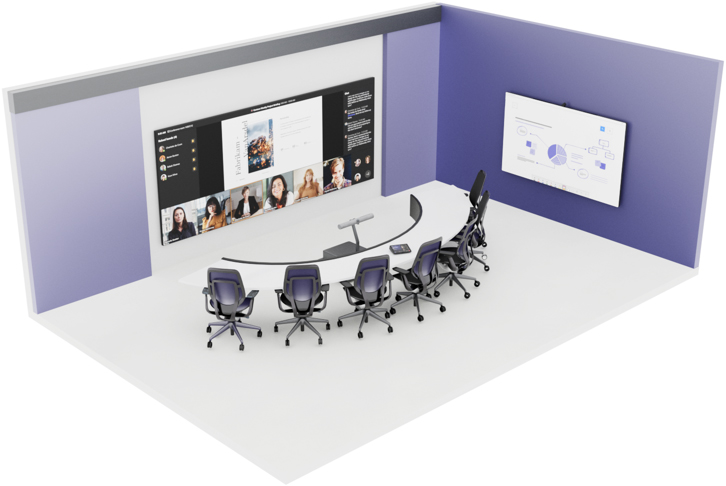
- Front Row Layout - Displays remote participants, shared content, chat, and meeting interactions in dedicated zones for a more inclusive hybrid meeting experience.
- Auto-framing Cameras - Automatically detect and keep speakers centred in the frame, ensuring remote participants always have a clear view.
- Beamforming Microphones - Focus on active speakers while reducing background noise for clearer voice pickup and natural conversations.
- Intelligent Content Capture - Enhances whiteboards and shared content so remote attendees can view and collaborate more effectively.
- One-Touch Join - Start scheduled Microsoft Teams meetings instantly with a single touch.
- Integrated Room Booking & Occupancy Sensors - Simplify room scheduling and improve workspace utilisation with real-time occupancy insights.
- Microsoft Teams Rooms Builder Expertise - CMPPL designs and deploys customised Microsoft Teams Rooms tailored to your meeting spaces and collaboration needs.
Every Microsoft Signature Teams Room should be designed around the room size, seating layout, display placement, and collaboration requirements. Read our guide on designing a 12-seater boardroom AV system to understand the key planning considerations.
© Image Copyright - Microsoft
What is Microsoft Front Row?
Front Row is Microsoft's intelligent meeting layout for Microsoft Signature Teams Rooms. It displays remote participants, shared content, chat, and meeting reactions in dedicated zones on the front-of-room display, creating a more inclusive and equitable hybrid meeting experience.
What You Will Experience
Microsoft Signature Teams Rooms are designed to make hybrid meetings more productive, engaging, and consistent. By combining intelligent room technology with seamless Microsoft Teams integration, organisations can improve collaboration, accelerate decision-making, and deliver a professional meeting experience across every workspace.
- Enhance Equity for Remote Participants
- Smarter and Quicker Decision Making Even with Hybrid Teams
- Effortless Transition from Brainstorming To Execution
- Executive Ready Rooms With Intuitive Tech
- Effortless Setup Built to Accelerate Adoption and Applicability
If you are thinking about Microsoft Teams Rooms partners in Bengaluru, Chennai, Delhi-NCR, Hyderabad, Mumbai or Pune, our experienced team can take you through a live Front Row demonstration and a site assessment. We’ll help you compare room layouts, camera coverage, audio performance and Microsoft Teams integration to find the right solution for your organisation. You can also read how acoustic treatment improves Microsoft Teams Rooms performance.
Benefits That Transcend Technology
Beyond advanced hardware and software, Microsoft Signature Teams Rooms help organisations create more efficient and collaborative workplaces. By simplifying meeting workflows and improving communication between in-room and remote participants, businesses can reduce delays, encourage greater participation, and build meeting spaces that scale with future business needs.
Based on feedback from our Microsoft Teams Rooms clients, the most consistent gains show up in three places: less time lost to manual joining and toggling, fewer support calls for basic audio or connection issues, and a more consistent meeting experience for teams presenting to clients.
- Faster, more consistent meeting starts
- Fewer IT interruptions for in-meeting technical issues
- Improved cross-team and client-facing engagement
- Room designs built to scale with your organisation
- Ongoing support from an Authorised Microsoft Teams Rooms partner
Discover how leading organisations have implemented Microsoft Teams Rooms with CMPPL by exploring our enterprise AV projects and client portfolio.
FAQs
A. Yes. Our Microsoft Teams Rooms setup is designed for compatibility with most infrastructure/systems. We would recommend a site visit by our experts to ascertain compatibility.
A. No. We're based across Bengaluru, Chennai, Delhi-NCR, Hyderabad, Mumbai & Pune, but we take on Microsoft Teams Rooms and Signature Teams Rooms projects nationwide with the same installation and support standards.
A. Depending on room size and complexity, a typical setup installation takes between 10 to 14 days
A. Absolutely. We are known for end-to-end solutions, and our experts will ensure that your teams are completely equipped to use the systems to their maximum potential
A. Choosing a partner guarantees compliance, seamless integration, and access to the latest updates and best practices of Microsoft Teams Rooms
A. Yes. As an Authorized Microsoft Teams Rooms Partner, we provide proactive support, regular updates, and quick resolutions to ensure your meeting spaces operate flawlessly.