Friday, 31 July 2026

What Is AV Signal Flow?
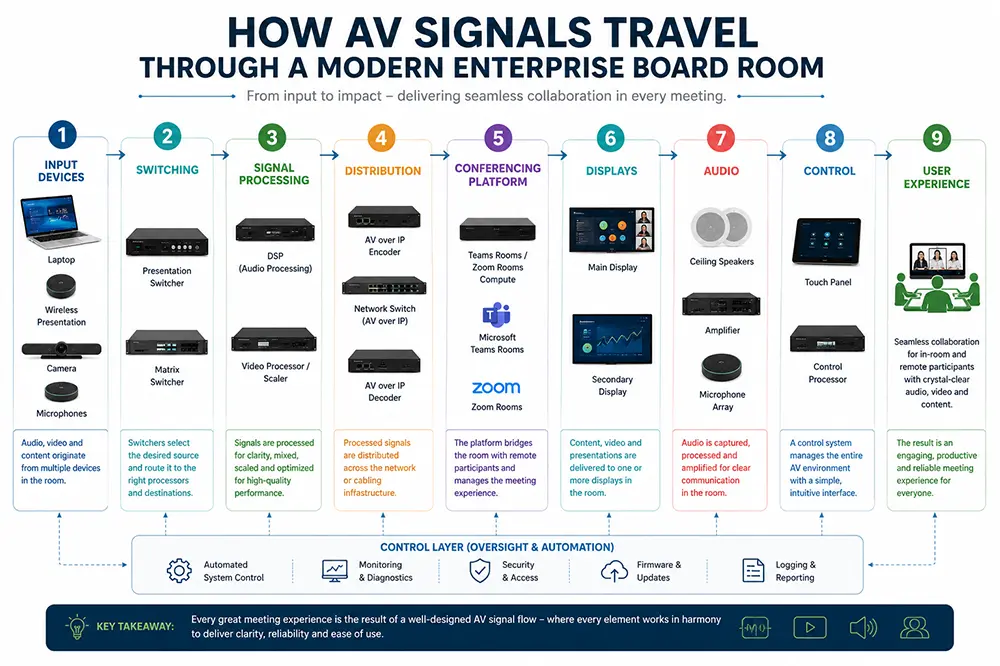
AV signal flow is the path a video and audio signal travels from the moment it leaves a source device to the moment it reaches a display or a remote participant. In the simplest room, that path is a laptop plugged directly into a screen. In an enterprise board room, the same idea scales into a coordinated chain: source devices, signal processing, switching, distribution, scaling, display devices, audio routing, and a control system that ties every stage together. Once IT teams can picture this chain as a sequence of connected stages rather than a black box of cables, troubleshooting, budgeting, and vendor conversations all become easier.
Why IT Managers Should Understand Signal Flow
IT managers do not need to design the room, but understanding signal flow changes how effectively they can support it. It shortens troubleshooting, because a fault can be isolated to a stage — source, switch, DSP, codec, or display — instead of guesswork. It improves system planning, since network capacity, cabling runs, and power requirements can be scoped correctly before installation. It reduces downtime and support tickets, because common failure points such as EDID mismatches or USB bandwidth limits are anticipated rather than discovered live. And it protects the meeting experience itself: a well-understood signal chain is one that has been engineered for reliability, not just switched on and hoped for.
Before mapping signal paths and equipment connections, it is important to understand the process of moving from floor plan to AV design, ensuring that device locations, cable routes, and connectivity requirements are planned effectively.
Typical AV Signal Flow in a Modern Board Room
A typical board room signal path moves through a predictable sequence. A laptop connects over USB-C or HDMI into a presentation switcher, which hands the signal to a matrix switch for routing to the correct display zone. From there it passes through a DSP for audio processing, into the video conferencing codec that bridges the room to Microsoft Teams or Zoom, out to the displays, and back through ceiling speakers and microphones. A control processor and touch panel sit across the whole chain, giving users a single point of control. In a Microsoft Teams Rooms deployment, the codec and control layer are often unified in a single certified device; in a Zoom Rooms deployment, a dedicated compute unit running the Zoom Rooms application performs the same role, calling on the same underlying switching and DSP layer beneath it. If you're comparing platform architectures, see our guide on Zoom Rooms vs Microsoft Teams Rooms.
For larger meeting spaces, signal flow must also account for room capacity, display coverage, microphone pickup, camera positioning, and the integration of multiple AV components. Our guide to designing AV architecture for large conference rooms with 20–50 participants explores these considerations in greater detail.
Understanding AV signal flow is also essential when selecting and deploying a meeting-room platform. For a broader look at how room type, IT ecosystem and collaboration platforms affect the overall design, see our guide to choosing between Teams, Zoom, Google Meet and Webex.
Components of AV Signal Flow
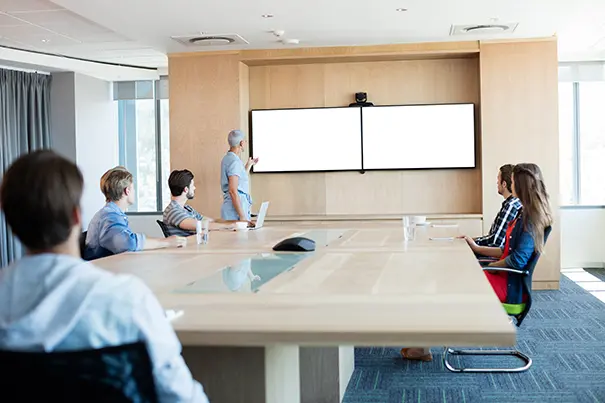
Each stage of the chain relies on specific hardware and standards. HDMI, USB-C, and DisplayPort carry signal from source devices; HDBaseT and AV over IP extend that signal over longer distances using structured cabling or the network. Network switches and matrix switchers route signal to the right destination. Digital signal processors (DSP) manage audio quality, echo cancellation, and mixing. Wireless presentation systems remove the need for a cable at the table. PTZ cameras and beamforming microphones capture the room; ceiling speakers and amplifiers deliver sound back into it. Effective sound reinforcement and acoustic design ensure that speech remains clear and intelligible for both in-room and remote participants. Interactive and LED displays present content, while control processors and touch panels give users a simple interface to a system that is, underneath, considerably more complex.
Signal Flow for Hybrid Meetings
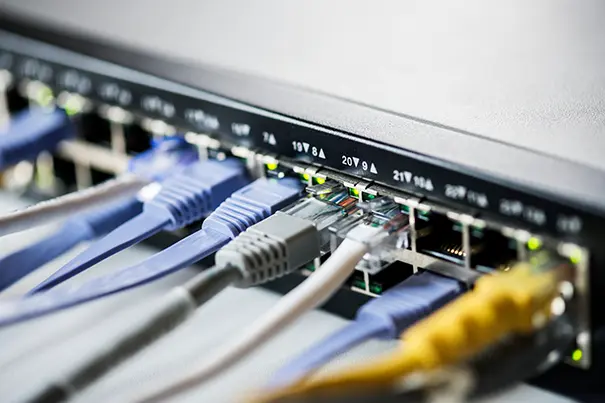
Hybrid meetings add a second, simultaneous signal path for remote participants. Camera switching decides which view is sent out; acoustic echo cancellation (AEC) and noise suppression clean the audio before it leaves the room; AI-powered framing keeps in-room participants correctly composed for people joining remotely. Content sharing, screen sharing, and recording each tap into the same signal chain at different points. When any one of these elements is misconfigured — a microphone placed outside its pickup pattern, or a camera preset that clips a speaker — the imbalance is felt immediately by remote attendees, even if the room itself looks fine to the people sitting in it. These principles are central to well-designed Hybrid Collaboration Rooms.
AV over IP in 2026
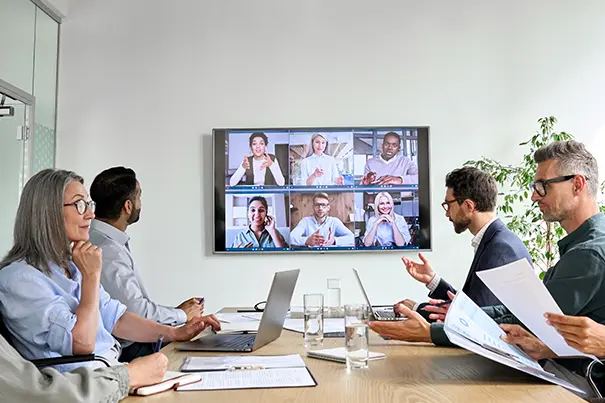
Many enterprises are moving away from dedicated matrix switching toward AV over IP, which carries video and audio signal across the standard network infrastructure using switches, VLANs, and quality-of-service (QoS) policies instead of a proprietary matrix. The appeal for IT teams is direct: AV over IP scales more easily across large campuses, offers greater flexibility as room layouts change, and can be centrally managed alongside the rest of the network. It does, however, put AV traffic squarely inside enterprise security and network planning, which means IT and AV teams need to collaborate early on segmentation, bandwidth allocation, and monitoring rather than treating the AV network as a separate, self-contained system.
Common Signal Flow Mistakes
- Incorrect cable selection for the run length or bandwidth required.
- Missing EDID management, causing resolution or handshake failures between sources and displays.
- USB bandwidth limitations when too many peripherals share one host connection.
- Audio feedback loops from poor gain structure or speaker/microphone placement.
- Latency introduced by unnecessary conversion or scaling stages in the chain.
- Poor microphone placement relative to the room's seating and acoustics.
- Network bottlenecks when AV over IP traffic is not prioritized with QoS.
- Inadequate power planning for PoE-powered endpoints and rack equipment.
- Lack of redundancy for signal paths that support business-critical meetings.
Best Practices for IT Managers
- Document the signal path for every standardized room type so support staff can diagnose faults stage by stage.
- Involve the network team early when specifying AV over IP, matrix switching, or PoE requirements.
- Standardize on certified Microsoft Teams Rooms or Zoom Rooms hardware to simplify support and firmware management.
- Build in EDID and firmware compatibility checks before a room goes live, not after the first failed meeting.
- Budget for commissioning and testing as a distinct project phase, separate from installation.
Future Trends
Signal flow design is evolving quickly. AI-enabled collaboration and intelligent camera tracking are becoming standard rather than premium features. USB-C is emerging as a de facto standard for single-cable connectivity. AV over IP continues to displace point-to-point matrix switching in larger deployments. Cloud device management and remote monitoring are shifting support from reactive to predictive, catching failing components before a meeting is affected. And as sustainability becomes a procurement criterion, software-defined AV — where functions once handled by dedicated hardware run on shared, updatable platforms — is reducing both energy use and hardware sprawl.

Conclusion
Understanding AV signal flow gives IT managers a shared language with facilities teams, end users, and AV integrators — and it turns board room and hybrid meeting room projects from a source of recurring support tickets into a predictable, well-engineered part of the workplace. CMPPL designs and integrates board rooms, Microsoft Teams Rooms, Zoom Rooms, and command and control AV solutions across India with that same principle: a signal chain that is planned, documented, and supported end to end, not assembled and left to chance.
Why Professional AV System Design Matters
A signal chain is only as strong as its weakest stage, which is why professional design and commissioning matter more than any single piece of hardware.
Signal integrity. Every conversion, extension, and switch point is a chance to lose resolution, introduce latency, or break a handshake — professional design minimizes the number of stages and validates each one.
Bandwidth planning. USB, network, and AV over IP bandwidth must be sized for the actual devices and resolutions in use, not assumed from a spec sheet.
Cable infrastructure. Cable category, length, and shielding are matched to the signal type and distance before installation, not discovered through trial and error.
Device interoperability. Certified, tested combinations of switchers, DSPs, codecs, and displays avoid the EDID and handshake failures that plague mismatched systems.
Firmware compatibility. Coordinated firmware versions across the chain prevent the intermittent faults that are hardest for IT helpdesks to diagnose.
Network planning. AV over IP and PoE deployments are segmented, secured, and prioritized in coordination with the wider enterprise network.
User experience. A room is only successful if a non-technical user can start a meeting in seconds — good design hides the complexity of the chain behind a simple interface. This reflects CMPPL's approach that technology should adapt to people, rather than forcing users to adapt to the technology.
Lifecycle support. Ongoing monitoring, firmware updates, and proactive maintenance keep a room performing as designed, years after installation.
Commissioning and testing. Every signal path is tested under real meeting conditions before handover, not assumed to work because each component powers on.
ABOUT THE AUTHOR
Sanjeev Kalhan is the Founder & CEO of CMPPL, with over 30 years in AV, computing and technology leadership. He founded CMPPL in 1995 and holds a B.Tech in Electrical Engineering from IIT Delhi and an MBA from IIM Calcutta. Connect with him on LinkedIn.
FAQ
A. AV signal flow is the path a video or audio signal travels from a source device, such as a laptop, through processing and switching stages, to its final destination — typically a display and a video conferencing codec.
A. Understanding signal flow lets IT and facilities teams isolate faults to a specific stage, plan cabling and network capacity correctly, and design rooms that are reliable rather than assembled ad hoc.
A. HDMI is a direct, point-to-point video connection over a dedicated cable. AV over IP encodes video and audio into network packets so they can be routed, switched, and scaled across standard network infrastructure using switches and VLANs.
A. A digital signal processor manages microphone mixing, gain, echo cancellation, and noise suppression, so remote participants hear clear, balanced audio regardless of how many microphones or speakers are active in the room.
A. HDBaseT is a standard for transmitting uncompressed HD video, audio, and control signals over a single structured cable, typically Cat5e/Cat6, over distances longer than HDMI can reliably support.
A. A matrix switcher allows multiple video sources to be routed to multiple displays or outputs simultaneously, which is essential in board rooms with several screens, confidence monitors, or recording feeds.
A. By understanding the signal chain, IT teams can test each stage in sequence — source, switch, DSP, codec, display — rather than restarting the whole system and hoping the fault resolves itself.
A. EDID (Extended Display Identification Data) is the handshake data a display sends to a source device to establish supported resolution and format. Poorly managed EDID is one of the most common causes of "no signal" errors in multi-display rooms.
A. A Microsoft Teams Rooms deployment sits at the codec and control layer of the signal chain — it depends on clean video and audio input from the switching and DSP stages beneath it to deliver a reliable meeting experience.
A. Room size and layout, the video conferencing platform in use, cabling and network capacity, microphone and camera placement, control system usability, and a commissioning and support plan should all be considered before installation begins.
Key Takeaways
- AV signal flow is the path a signal takes from a source device to a display and, in hybrid meetings, to remote participants.
- The typical board room signal chain runs from source, through switching and DSP, into a video conferencing codec, and out to displays and speakers.
- Understanding signal flow helps IT teams isolate faults quickly instead of troubleshooting the whole system at once.
- Microsoft Teams Rooms and Zoom Rooms both sit at the codec and control layer of the signal chain.
- AV over IP is increasingly replacing traditional matrix switching for scalability and centralized management.
- EDID mismanagement and USB bandwidth limits are among the most common causes of AV failures.
- Digital signal processors (DSP) are responsible for echo cancellation, noise suppression, and audio mixing quality.
- AV over IP deployments require coordination between AV and network teams on VLANs and quality-of-service policies.
- Commissioning and testing under real meeting conditions are essential before a room is handed over to users.
- Professional AV design reduces downtime, support tickets, and long-term total cost of ownership for enterprise meeting spaces.
Designing or refreshing a board room, Microsoft Teams Room, Zoom Room, or executive meeting space? CMPPL's AV systems integration team designs signal chains that are planned, documented, and supported end to end — so your rooms work reliably from day one and stay that way. Talk to our AV consultants about scoping your next collaboration space.
For any inquiries or to discuss your requirements, please feel free to contact CMPPL through our website at www.cmppl.com or by email at info@cmppl.com. Our team will be happy to assist you.