Wednesday, 15 April 2026
Hybrid meetings have become an integral part of how modern organizations collaborate. Recognizing this shift, CMPPL focuses on designing AV environments that allow hybrid collaboration to function seamlessly.
Teams now join meetings from multiple offices, home workspaces, and even while on the move. Yet many conference rooms were originally designed for a different reality - one where everyone sat around the same table. Given this change, simply adding a camera and a display is rarely enough. Hybrid conference rooms need a carefully planned AV integration approach that ensures every participant - whether seated in the room or joining remotely - can participate and contribute with ease.
Creating such an experience goes beyond simply installing equipment. It requires a clear understanding of signal flow, control systems, redundancy planning, and the ability to scale the environment for future needs. This is the approach that guides how CMPPL designs AV environments.
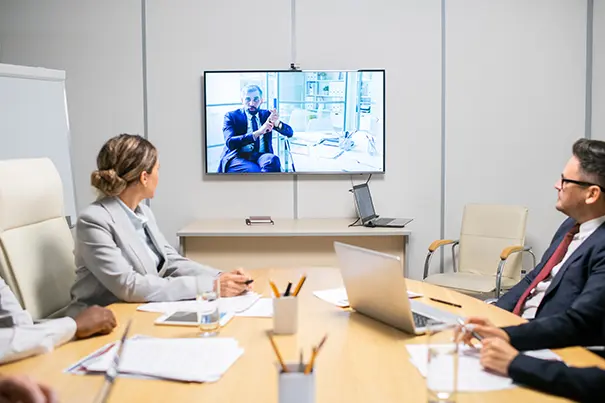
The First Layer Of AV Design Is Signal Flow Architecture
When people walk into a meeting room, the first thing they notice are the screens, cameras, and the sleek hardware on the table. What remains invisible is the signal architecture, in the background, quietly coordinating everything.
Signal flow is what determines how audio, video, and shared content move between devices. It connects laptops, cameras, microphones, displays, and collaboration platforms. All the devices then work together as one integrated system.
When the ‘architecture’ is designed well, the experience feels effortless:
- presentation content appears instantly across all displays
- remote participants receive clear, synchronized audio and video
- switching between presenters happens smoothly
- system latency stays minimal
When signal flow is not designed properly, problems show up quickly. Screen sharing takes longer than it should, audio echoes, speaker switching is flawed, and the meeting rooms slowly fall out of sync.
This is why hybrid conference rooms are built around clearly structured signal paths supported by centralized switching systems. When the underlying architecture is planned well, all the devices in the room work together smoothly, and as one system.
Designing Camera Visibility, Not Just Video
In real meetings, the conversation rarely stays in one place. People turn toward each other, someone across the table joins the conversation, and the focus regularly shifts as different participants begin speaking. A single fixed camera usually misses most of these ‘moments’ of interactions. This makes it harder for remote participants to follow everything going on in the meeting room.
That’s why hybrid meeting rooms need thoughtful camera placement. A wider view of the room helps remote participants see how the conversation is moving across the table. Cameras that automatically focus on the person speaking make it easier for remote participants to follow the meeting and never miss any conversation.
There are several factors to consider when designing a camera setup in rooms.
- Size of the table and the seating arrangement
- Lighting in the room
- Movement of participants in the room, during meetings
- Whether whiteboards or collaboration surfaces need to remain visible
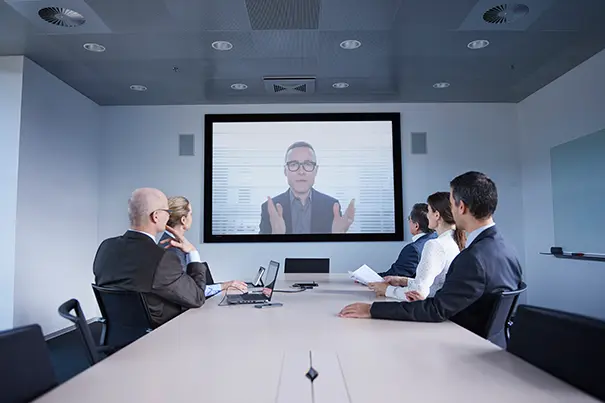
The objective of the cameras should not be just to show the room on screen. The real goal should be to help remote participants to feel part of the discussion, rather than being passive spectators.
Most Hybrid Rooms Fail Due to Poor Microphone Design
Microphone clarity often determines whether hybrid meetings succeed or fail. This is because many conference room designs underestimate the complexity of microphone placement. Ceiling arrays, table microphones, and beamforming technologies - each of them serve different purposes, depending on the room size and acoustics.
Effective microphone strategies ensure:
- Consistent voice pickup from every seat
- Elimination of echo and background noise
- Balanced audio levels for both in-room and remote participants
Remote participants might tolerate imperfect video quality, but poor sound quality is always unacceptable. This is why the microphone setup also requires focused attention.
Why Hybrid Rooms Need Multiple Screens
Since hybrid meetings mean participants from many locations, hybrid rooms must have multiple visual streams simultaneously. All participants must have access to:
- All participants (irrespective of location)
- Shared content
- Clear visuals
Hence, the multiple displays should be arranged strategically to enable a natural, seamless flow during meetings. When the displays are positioned correctly, participants can maintain eye contact and visual engagement. When placed poorly, participants usually end up speaking toward the screen and face away from the other participants. Display planning, too, therefore, influences the meeting room dynamic.
Control Systems Make AV Management Simpler
Well-designed control systems ensure seamless meeting experiences by bringing everything in the room together. Users can start meetings, adjust lighting, change inputs, and manage displays from a single panel, instead of handling multiple devices. The success of any hybrid room meeting depends on how easily people can use it without technical assistance. If a user hesitates or fumbles, the technology is already not working for them.
Reliability Built Into The System
Hybrid collaboration is now a critical part of organizational workflow. Conference rooms support discussions, daily operations, and decisions - and so are not just meeting spaces. And this is exactly why reliability is indispensable.
High-quality AV designs plan for the unexpected, which helps meetings to continue smoothly even if a disruption occurs. These plans could include backup signal paths, failover network connections, secondary control systems, and power protection. Reliability, therefore, is not something added later - it is built into the system at the start.
Designing To Be Future Ready
Hybrid collaboration continues to evolve rapidly. Hence, a conference room installed with tech and designs today must remain effective for years. Future-ready hybrid collaboration rooms, therefore, consider:
- Modular hardware components
- Compatibility for firmware update
- Easy integration with evolving collaboration platforms
- Seamless expansion to additional rooms and locations
Choosing the right AV architecture also means choosing how the room will operate across collaboration platforms. For guidance on evaluating Teams, Zoom, Google Meet and Webex based on IT ecosystem, security, user behaviour and room type, see our guide to choosing the right meeting-room platform.
Scalability lets your system grow as your organization grows, so it doesn’t become obsolete after a few upgrades.
For boardrooms built around Microsoft Teams, future-ready planning also requires the right room layout, camera coverage, microphone placement, display positioning, and platform integration. Explore our guide to designing future-ready Microsoft Teams Rooms for Indian boardrooms for more specific design and deployment considerations.
The Impact of Hybrid Rooms on Communication
Technology shapes behaviour more than organizations realize. The way conference rooms are designed affects:
- Team interactions across locations
- How leadership connects with multi-locational teams
- How effectively decisions move across departments
Collaboration feels natural when hybrid environments work smoothly, but the reverse is also true when such environments don’t work as expected.
Therefore, thoughtful AV integration is of critical importance in shaping the culture of an organization.
What’s Next?
Hybrid Collaboration is at the heart of how organizations work. Therefore, at CMPPL , designing conference rooms is not just about installing devices. We start by understanding how your teams actually meet, collaborate, and reach decisions. We then build spaces to support that flow.
We handle every detail - from control systems and signal setups to backup plans and scalability. Our AV environments are reliable, flexible, and designed to grow with your organization. A structured AV assessment by our experts ensures your spaces work exactly as you want them to.
Whether you are planning a new hybrid space or upgrading an existing one, CMPPL can help. Connect with our experts to see how your collaboration spaces can support today’s meetings and tomorrow's growth.
ABOUT THE AUTHOR
Sanjeev Kalhan is the Founder & CEO of CMPPL, with over 30 years in AV, computing and technology leadership. He founded CMPPL in 1995 and holds a B.Tech in Electrical Engineering from IIT Delhi and an MBA from IIM Calcutta. Connect with him on LinkedIn.
For any inquiries or to discuss your requirements, please feel free to contact CMPPL through our website at www.cmppl.com or by email at info@cmppl.com. Our team will be happy to assist you.